Copilot Workspaces brings teams, files, and Office editing together
Teams share context and edit files in Copilot Workspaces
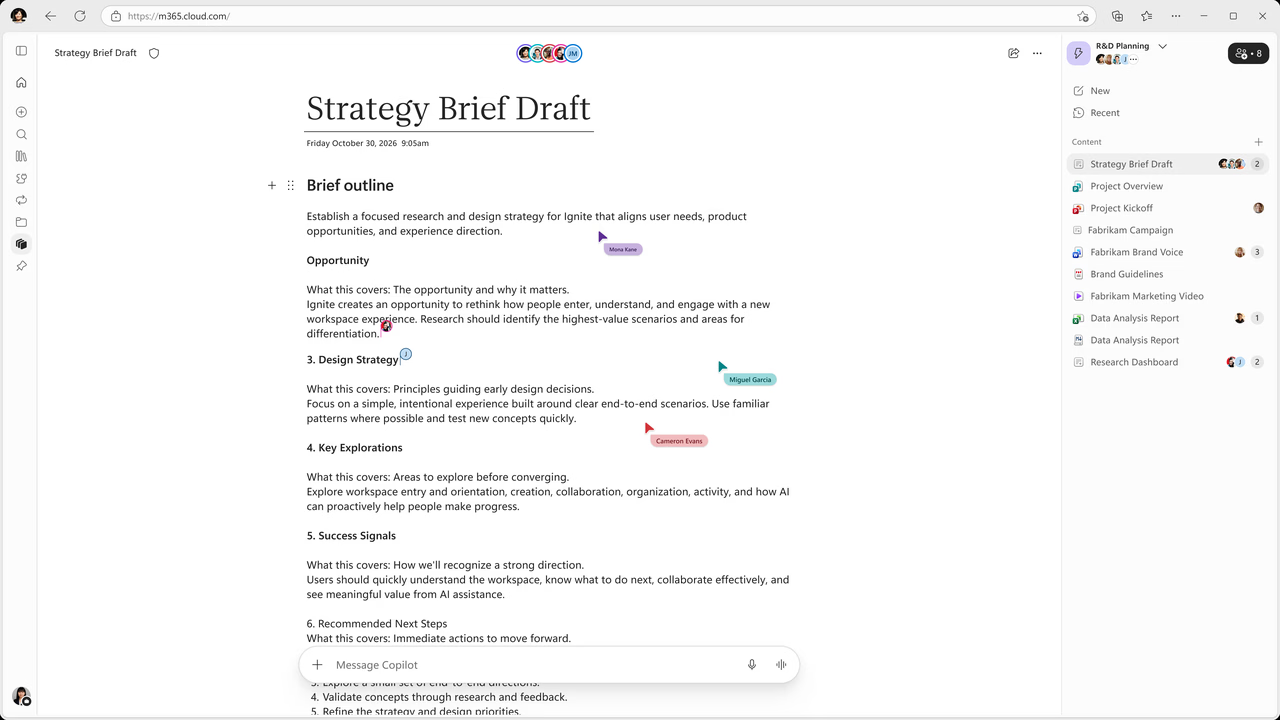
Microsoft's published visual. Source: Microsoft. · Verified 2026-11-08
Copilot Workspaces, the evolution of Copilot Notebooks, gives teams a shared space in the Copilot app for ongoing workstreams. It rolled out to Frontier in October 2026.
Key points
- Teams can collaborate across documents and see others’ work with live cursors.
- Users can ask Copilot to create or edit Word, Excel, and PowerPoint files, then refine them without leaving the workspace.
- Audio Overview adds topic-based episodes and new formats such as Critique and Debate.
- Audio Overview updates are scheduled to roll out worldwide in November 2026.
- Office file editing is scheduled to roll out worldwide in January 2027.
What to do
Tell users that existing notebooks will become workspaces. Explain that the October release is in Frontier, with separate worldwide schedules for Audio Overview updates and Office file editing. Include live collaboration and in-place file editing in adoption guidance. Explain that Audio Overview sensitivity labels are inherited from sources when saved to OneDrive.
Timeline
- October 2026 In Microsoft’s monthly deck
- October 2026 Preview (confirmed) Copilot Workspaces rolled out to Frontier.
- October 2026 Rollout start (confirmed) JPG, PNG, CSV, and TSV references rolled out.
- November 2026 Rollout start (planned) Audio Overview updates: planned worldwide availability.
- January 2027 Rollout start (planned) Office file editing: planned worldwide availability.
Speaker notes
Copilot Workspaces brings context, team members, and working files together around an ongoing workstream, and existing notebooks will become workspaces. Live cursors help teams see what others are working on across different documents. Office file editing lets users move from a chat request to refining Word, Excel, and PowerPoint files inside the workspace. Workspaces and both named updates rolled out to Frontier in October 2026; worldwide rollout is planned for Audio Overview updates in November 2026 and Office file editing in January 2027. Audio Overview inherits source sensitivity labels when saved to OneDrive and adds references such as Outlook emails, Teams meetings and chats, OneNote and Loop pages, and .txt files. JPG, PNG, CSV, and TSV references rolled out in October 2026, while Markdown, TXT, and RTF references are generally available. The source does not specify licensing or admin controls.
Sources and links
- Microsoft deck Microsoft deck What's New in Microsoft Copilot, October 2026 (slide 13)
- ai-news.cz article Article on ai-news.cz (in Czech)
- Blog Microsoft blog: What’s New in Microsoft Copilot | October 2026
- Blog Microsoft blog: What's New in Notebooks | October 2026
Related cards
Area, status, change type, licence and flags are indicative. Always open the source before you act on a card.