Brand Kit setup, publishing, and template assessment in PowerPoint
Brand managers gain PowerPoint Brand Kit controls
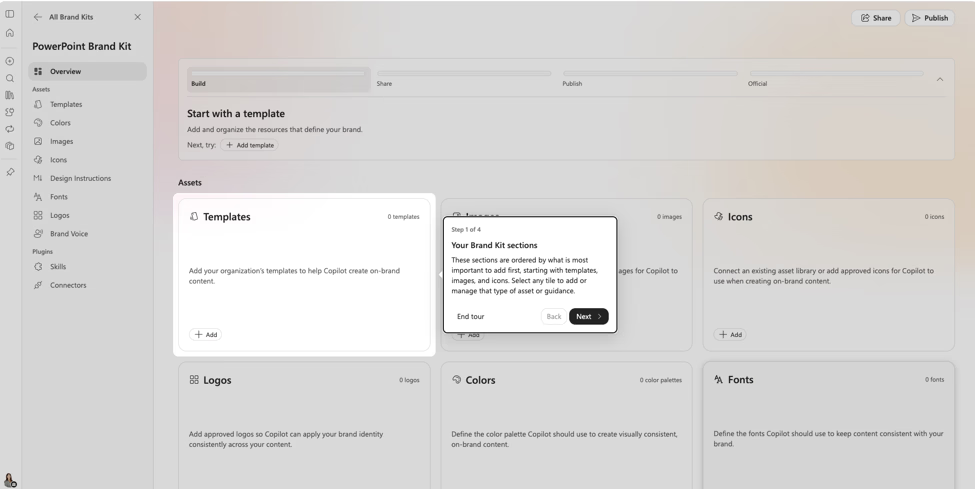
Partial view of the feature. Source: Microsoft. · Verified 2026-11-08
Microsoft rolled out Brand Kit setup, publishing, and template assessment improvements in PowerPoint in October 2026. The changes help brand managers prepare approved brand assets for Copilot-generated presentations.
Key points
- Streamlined asset management and workflows reduce the steps needed to create and configure a kit.
- A dedicated publish flow lets brand managers make official Brand Kits available to users or unpublish them.
- The template assessment skill gives actionable recommendations for template issues that could affect Copilot-generated presentations before publication.
What to do
Tell brand managers about the simpler setup and publish flow. Add template assessment to the preparation process before publishing a Brand Kit. Explain how to unpublish an official kit when it should no longer be available to users.
Timeline
- October 2026 In Microsoft’s monthly deck
- October 2026 Rollout end (confirmed) Brand Kit setup, publishing, and template assessment rolled out.
Speaker notes
These changes cover how brand managers prepare and release Brand Kits in PowerPoint. Streamlined asset management reduces the setup steps. Publishing is a separate control over when an official kit becomes available, and managers can take it down when needed. Template assessment gives actionable recommendations before publication; it should not be described as automatically fixing template issues. Microsoft states that all these features rolled out in October 2026. The source does not specify licensing requirements or tenant admin settings.

Partial view of the feature. Source: Microsoft. · Verified 2026-11-08

Partial view of the feature. Source: Microsoft. · Verified 2026-11-08

Partial view of the feature. Source: Microsoft. · Verified 2026-11-08

Partial view of the feature. Source: Microsoft. · Verified 2026-11-08

Partial view of the feature. Source: Microsoft. · Verified 2026-11-08

Partial view of the feature. Source: Microsoft. · Verified 2026-11-08

Partial view of the feature. Source: Microsoft. · Verified 2026-11-08

Partial view of the feature. Source: Microsoft. · Verified 2026-11-08

Partial view of the feature. Source: Microsoft. · Verified 2026-11-08
Sources and links
- Microsoft deck Microsoft deck What's New in Microsoft Copilot, October 2026 (slide 23)
- Blog Microsoft blog: What’s New in Microsoft Copilot | October 2026
Related cards
Area, status, change type, licence and flags are indicative. Always open the source before you act on a card.